We always study HTTP details when ever we are learning any server base language. HTTP details includes about the HTTP request and HTTP response. Following video shows how we can monitor HTTP headers using Fire fox addons.
Tuesday, February 19, 2013


Saturday, February 16, 2013
Hello Friends, I have started posting videos on various topics on you tube. The video are created for helping the students and learners. If you want any help you can connect to me using email [ast.bhatia@gmail.com ].
https://www.youtube.com/profashish
https://www.youtube.com/profashish
Friday, September 21, 2012
File IO in java.
Added a PPT for File handling in java in two parts yet more to come. The content is for the educational purpose only. Material have been taken from book, internet with no intention of breaking any rights issues.
Sunday, June 19, 2011
Creating Stateless EJB with GlassFish
In this sample example we will be creating the stateless ejb with glasshfish and ant. Using ant is optional as it will automate the build on basis of the script.
Prerequisite:
We won't go in setting the path for anything. We will be using the bin folder to run. But yes for easy build, path can be set. The path can be set for glassfish and ant in following ways.
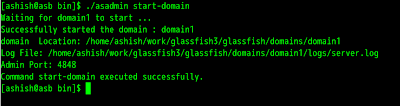
Bingo! We are done for making the sample application.
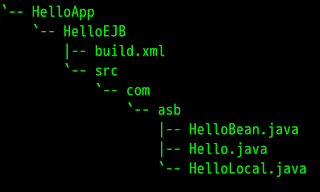
Lets create HelloWorld Application. We need three java file Hello.java, HelloLocal.java, HelloBean.java and one xml file i.e. build.xml. We will create the package com.asb. Our directory structure will look like
This structure can exist in any drive or directory.
Code for the files
----------
Hello.java
----------
---------------
HelloLocal.java
---------------
HelloBean.java
--------------
---------
build.xml
---------
To build using ant we will go to bin directory where the ant was extracted.
ant/bin>./ant compile -buildfile <path to helloapp>/HelloEJB/build.xml -lib <path to glassfish>/lib/javaee.jar
ant/bin>./ant dist -buildfile <path to helloapp>/HelloEJB/build.xml -lib <path to glassfish>/lib/javaee.jar
glassfish/bin>./asadmin start-domainglassfish/bin>./asadmin deploy <path to="" helloapp>/HelloEJB/dist/lib/HelloBean-<date>.jar
We are done with the deployment.
To run we need client program
To compile and run
javac -cp <path to glassfish>/lib/javaee.jar:. HelloClient.java
java -cp <path to glassfish>/lib/javaee.jar:<path to glassfish>/lib/appserv-rt.jar HelloClient
We are done we will get the output HelloWorld.
Prerequisite:
- GlassFish version 3.1 [i am using zip format]. Click to download
- Apache-ant version 1.8.2 [i am using .tar.gz format ]. Click to download
- Java up and running [ JDK ]
We won't go in setting the path for anything. We will be using the bin folder to run. But yes for easy build, path can be set. The path can be set for glassfish and ant in following ways.
- For GlassFish : GLASSFISH_HOME=<absolute path of glassfish>/bin
- For ant : ANT_HOME=<absolutepath of ant >/bin

terminal screen to run glassfish
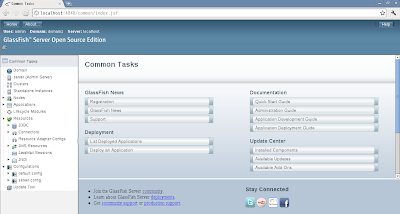
To test administrative console open the browser with url http://localhost:4848. We will get
To test administrative console open the browser with url http://localhost:4848. We will get

Bingo! We are done for making the sample application.
Lets create HelloWorld Application. We need three java file Hello.java, HelloLocal.java, HelloBean.java and one xml file i.e. build.xml. We will create the package com.asb. Our directory structure will look like

This structure can exist in any drive or directory.
Code for the files
----------
Hello.java
----------
package com.asb;
public interface Hello
{
    public String sayHello();
    public String sayHelloRemote();
}
---------------
HelloLocal.java
---------------
package com.asb;
public interface HelloLocal
{
    public String sayHello();
    public String sayHelloLocal();
}
--------------HelloBean.java
--------------
package com.asb;
import javax.ejb.Stateless;
import javax.ejb.Remote;
import javax.ejb.Local;

@Stateless
@Remote(Hello.class)
@Local(HelloLocal.class)
public class HelloBean implements Hello,HelloLocal
{
    public String sayHello()
    {
        return "Hello World";
    }
    public String sayHelloLocal()
    {
        return "Hello Local World";
    }
    public String sayHelloRemote()
    {
       return "Hello Remote World";
    }
}
---------
build.xml
---------
<project name="HelloEJB" basedir=".">
    <description>
         Simple Build File
    </description>
    <!-- set global properties for this build -->
    <property name="src.dir" location="src"/>
    <property name="build.dir" location="build"/>
    <property name="dist.dir" location="dist"/>

    <target name="init">
        <!-- For timeStamp -->
        <tstamp/>
        <mkdir dir="${build.dir}"/>
    </target>

    <target name="compile" depends="init">
        <javac srcdir="${src.dir}" destdir="${build.dir}" includeantruntime="true"/>
    </target>

    <target name="dist" depends="compile">
        <mkdir dir="${dist.dir}/lib"/>
        <jar jarfile="${dist.dir}/lib/HelloBean-${DSTAMP}.jar" basedir="${build.dir}"/>
    </target>

    <target name="clean">
        <delete dir="${build.dir}"/>
        <delete dir="${dist.dir}"/>
    </target>
</project>
To build using ant we will go to bin directory where the ant was extracted.
ant/bin>./ant compile -buildfile <path to helloapp>/HelloEJB/build.xml -lib <path to glassfish>/lib/javaee.jar
ant/bin>./ant dist -buildfile <path to helloapp>/HelloEJB/build.xml -lib <path to glassfish>/lib/javaee.jar
glassfish/bin>./asadmin start-domainglassfish/bin>./asadmin deploy <path to="" helloapp>/HelloEJB/dist/lib/HelloBean-<date>.jar
We are done with the deployment.
To run we need client program
package com.asb.client;

import javax.naming.*;
import com.asb.Hello;

public class HelloClient
{
    public static void main(String args[])
    {
        try
        {
            InitialContext ctx = new InitialContext();
            Hello h = (Hello) ctx.lookup("com.asb.Hello");
            System.out.println(h.sayHello());
            System.out.println(h.sayHelloRemote());
        }
        catch(Exception e)
        {
            e.printStackTrace();
        }
    }
}
To compile and run
javac -cp <path to glassfish>/lib/javaee.jar:. HelloClient.java
java -cp <path to glassfish>/lib/javaee.jar:<path to glassfish>/lib/appserv-rt.jar HelloClient
We are done we will get the output HelloWorld.
Friday, June 10, 2011
Creating Hello World Servlet
A simple video [ screencast ] to show how to develop the HelloWorld Servlet.
Friday, November 19, 2010
Replacing old *nix with Fedora 14
Last time when i installed fedora am not that happy; the problem may be on my side or on other side; i dont know.
I thought lets give it a try again. I installed fedora 14, installation was smooth but i faced some problem in creating the bootable usb drive. But it got resolved in few tries. I installed fedora and trust me installation was too smooth.
After the installation i need to make it ready for using [ missing softwares ]
I started with Java.
Installing Java
Ok Lets try it out. You may require root access.
Next is openoffice
yum install openoffice*
To enjoy mp3 and other restricted softwares we need to enable the restricted repos.
This is all for Fedora 14.
I thought lets give it a try again. I installed fedora 14, installation was smooth but i faced some problem in creating the bootable usb drive. But it got resolved in few tries. I installed fedora and trust me installation was too smooth.
After the installation i need to make it ready for using [ missing softwares ]
I started with Java.
Installing Java
- Download jdk and jre from goo.gl/nqkjo. Download bin files.
- Change it to become executable [ chmod +x file ]
- Run bin file
- Using alternative --install command.
Ok Lets try it out. You may require root access.
- Open Terminal
- wget goo.gl/JMYjs This will download jdk-6u22-linux-i586-rpm.bin
- chmod +x jdk-6u22-linux-i586-rpm.bin
- ./jdk-6u22-linux-i586-rpm.bin
- alternatives --install /usr/bin/java java /usr/java/jdk1.6.0_22/jre/bin/java 20000
- alternatives --install /usr/bin/javaws javaws /usr/java/jdk1.6.0_22/jre/bin/javaws 20000
- java -version
Next is openoffice
yum install openoffice*
To enjoy mp3 and other restricted softwares we need to enable the restricted repos.
This is all for Fedora 14.
Wednesday, July 28, 2010
After the Currency symbol its time for Indian browser
It is again time for us to take proud, after the Indian currency symbol, their is a new browser for the Indians. The browser named “Epic” : The first ever web browser for India develop by Hidden Reflex. It has so many cool features that make it more user friendly. It comes with the side bar for the various services or widgets which includes
- News from the india
- Transliterator for Indian scripts, it supports 12indian languages
- Skins
- Antivirus powered by eset
- Editing and saving html files
- Snippets that let you drag and drop the content and save it for later use
- Video service that let you stream video in small pane and let you keep browsing the web
- Todos
- Gmail
- Orkut
- Yahoo
- Maps
- Travel
- Jobs
- Games
- Backup
Have a look at screenshots.
Its still not available on linux only exe version is out. As it is built on Mozilla so it supports all the add-ons and plug-in that fire fox supports. It also comes with Epic App that allow to add more to the sidebar. With few hours of usage i feel its good one. One should give it a try.
Wednesday, February 10, 2010
Buzz
Today when i logged in gmail account it will ask you to go for Buzz!!! A new social networking initiative (is it correct!!!) by Google people. It let me share picasa photos,flickr, google reader, status, chatlogs, links, twitter ... and many more. Using it i had a felling like twitter and bit of facebook. Yes we can tweak to what to be shared in what manner (public or private). . It also suggest the list of your contacts to follow and following category. It overcomes the limitation of 140 character twitter. :) Now posting of long text is allowed. The best part is ...... Inbox Integration. The look and feel awesome (thumbnails).
@replies are also supported.
Although your inbox will be vibrating to show the new notification for the buzz you receives. Its ok when we get so many things bundled up.
Tuesday, December 22, 2009
Got like this on boot grub> !!! Restoring back to normal
Now a days when we are moving towards open source its common to find the two operating system on the pc or laptop. The one is linux which come with own loader GRUB. Sometimes it may happen due to ignorance or experimental purpose grub is mishandled and the result is a grub prompt at restart ...........
Many of us just get afraid and stuck to old but bad formula of formatting all drives and installing all the stuff again STRANGE!!!!
In this post you will find precise steps to recover your Grub.
First step is to find whether grub can open and read any files on any partition
grub> find /boot/grub/stage1
This will return partition in the form of (hdX,Y). For example (hd0,5)
Next step is to intall the grub.
grub> root(hd0,5)
grub> setup(hd0,5)
Next step is to tell grub about the kernel and initrd img. Assuming its in sda2
grub> kernel /boot/[select your vimlinuz PRESSING TAB] root=/dev/sda2
grub> initrd /boot/[select your initrd image PRESSING TAB]
Make sure you select the same version in both kernel and initrd.
Last step is to boot in to machine
grub> boot
This will return you to command prompt interface. Just do a normal login and type startx to start GUI.
startx
Bingo You are done.
Next step is to restore the menu.lst or make new one. Search for the menu.lst in /boot/grub/.
If its empty you need to add few lines for showing grub menu in while booting. We need to know the various UUID (Universally Unique Identifier) and details of the partition. Run the command
cat /etc/fstab
or
ls -al /dev/disk/by-uuid/*
menu.lst normally looks like
title Ubuntu 9.04, kernel 2.6.28-11-generic
uuid 63451d1e-eba4-487e-ba98-eee9e58e3101
kernel /boot/vmlinuz-2.6.28-11-generic root=UUID=63451d1e-eba4-487e-ba98-eee9e58e3101 ro quiet splash
initrd /boot/initrd.img-2.6.28-11-generic
quiet
title Ubuntu 9.04, kernel 2.6.28-11-generic (recovery mode)
uuid 63451d1e-eba4-487e-ba98-eee9e58e3101
kernel /boot/vmlinuz-2.6.28-11-generic root=UUID=63451d1e-eba4-487e-ba98-eee9e58e3101 ro single
initrd /boot/initrd.img-2.6.28-11-generic
title Ubuntu 9.04, memtest86+
uuid 63451d1e-eba4-487e-ba98-eee9e58e3101
kernel /boot/memtest86+.bin
quiet
title Microsoft Windows XP Professional
rootnoverify (hd0,0)
savedefault
makeactive
chainloader +1
title : shows as in Grub Menu option
UUID : For disks
kernel : for loading os
initrd image
Make your ones with the appropriate enttries and UUID and done. Save file and reboot the system.
Many of us just get afraid and stuck to old but bad formula of formatting all drives and installing all the stuff again STRANGE!!!!
In this post you will find precise steps to recover your Grub.
First step is to find whether grub can open and read any files on any partition
grub> find /boot/grub/stage1
This will return partition in the form of (hdX,Y). For example (hd0,5)
Next step is to intall the grub.
grub> root(hd0,5)
grub> setup(hd0,5)
Next step is to tell grub about the kernel and initrd img. Assuming its in sda2
grub> kernel /boot/[select your vimlinuz PRESSING TAB] root=/dev/sda2
grub> initrd /boot/[select your initrd image PRESSING TAB]
Make sure you select the same version in both kernel and initrd.
Last step is to boot in to machine
grub> boot
This will return you to command prompt interface. Just do a normal login and type startx to start GUI.
startx
Bingo You are done.
Next step is to restore the menu.lst or make new one. Search for the menu.lst in /boot/grub/.
If its empty you need to add few lines for showing grub menu in while booting. We need to know the various UUID (Universally Unique Identifier) and details of the partition. Run the command
cat /etc/fstab
or
ls -al /dev/disk/by-uuid/*
menu.lst normally looks like
title Ubuntu 9.04, kernel 2.6.28-11-generic
uuid 63451d1e-eba4-487e-ba98-eee9e58e3101
kernel /boot/vmlinuz-2.6.28-11-generic root=UUID=63451d1e-eba4-487e-ba98-eee9e58e3101 ro quiet splash
initrd /boot/initrd.img-2.6.28-11-generic
quiet
title Ubuntu 9.04, kernel 2.6.28-11-generic (recovery mode)
uuid 63451d1e-eba4-487e-ba98-eee9e58e3101
kernel /boot/vmlinuz-2.6.28-11-generic root=UUID=63451d1e-eba4-487e-ba98-eee9e58e3101 ro single
initrd /boot/initrd.img-2.6.28-11-generic
title Ubuntu 9.04, memtest86+
uuid 63451d1e-eba4-487e-ba98-eee9e58e3101
kernel /boot/memtest86+.bin
quiet
title Microsoft Windows XP Professional
rootnoverify (hd0,0)
savedefault
makeactive
chainloader +1
title : shows as in Grub Menu option
UUID : For disks
kernel : for loading os
initrd image
Make your ones with the appropriate enttries and UUID and done. Save file and reboot the system.
Sunday, November 22, 2009
go : Part 1
go : a new language by google. Best is its OPEN SOURCE. As it says its fast, simple, fast, secure, c0ncurrent, fun, opensource!
We are done now ..... We have successfully installed go :)
Lets see what is there in bin directory. There are many executable files. We should see 8g (Compiling), 8l (linking).
The file have an extension .go. So lets create hello.go with following lines
Open Terminal
Lets try out another program. This will read command line arguments and displays the same. Like echo command
Open text editor and add following lines
Carefully see the if condition and for loop, its bit syntactically different from what we have seen in c, c++, Java. No need to add condition or for loop parameter in (). But the body should be enclosed in {}.
See the usage of i:=0. No forward declaration is required as := will initialize and assign the value to i and compiler will know what to do with i.
Seems Simple.. But still this is the very very basic things rather not basic also there are lot many features to be seen.
Keep looking will publish the next post with more information and what more in go.
This article covers the
Step 1 : Installation
Step 2 : Hello World program
Step 1 : Installation
Best way is to look in go site
- Create two directories in your home namely go and bin. (you can set any path). For simple understanding i have created the directory in home folder. If you choose different path than in place of $HOME write your path like /home/abc/golang/go ...
- Open .bashrc file. Normally its at your home. Open $HOME/.bashrc in editor.
- Add following lines (assuming u have 32 bit computer).
export GOROOT=$HOME/go
export GOARCH=386
export GOOS=linux
export GOBIN=$HOME/bin - Open Terminalprogrammer@programmer-laptop:~$ sudo easy_install mercurialprogrammer@programmer-laptop:~$[sudo] password for programmer:Searching for mercurialBest match: mercurial 1.3.1Processing mercurial-1.3.1-py2.6-linux-i686.eggmercurial 1.3.1 is already the active version in easy-install.pthInstalling hg script to /usr/local/binUsing /usr/local/lib/python2.6/dist-packages/mercurial-1.3.1-py2.6-linux-i686.eggProcessing dependencies for mercurialFinished processing dependencies for mercurialprogrammer@programmer-laptop:~$ hg clone -r release https://go.googlecode.com/hg/ $GOROOTprogrammer@programmer-laptop:~$ sudo apt-get install bison gcc libc6-dev ed makeprogrammer@programmer-laptop:~$ cd $GOROOT/srcprogrammer@programmer-laptop:~$ ./all.bash
--- cd ../test N known bugs; 0 unexpected bugs
Lets see what is there in bin directory. There are many executable files. We should see 8g (Compiling), 8l (linking).
The file have an extension .go. So lets create hello.go with following lines
package main //Says its main package
import "fmt" // import

func main() //Entry Point
{
        fmt.Print("Hello,  World\n"); //Printf /cout/
}
Open Terminal
programmer@programmer-laptop:~$ cat hello.go
package main
import "fmt"
func main()
{
fmt.Print("Hello, World\n");
}
programmer@programmer-laptop:~$ 8g hello.go
programmer@programmer-laptop:~$ 8l hello.8
programmer@programmer-laptop:~$ 8.out
Hello, World
programmer@programmer-laptop:~$
package main
import "fmt"
func main()
{
fmt.Print("Hello, World\n");
}
programmer@programmer-laptop:~$ 8g hello.go
programmer@programmer-laptop:~$ 8l hello.8
programmer@programmer-laptop:~$ 8.out
Hello, World
programmer@programmer-laptop:~$
Simple isn't it !!
8g is go compiler and will create a file with extension .8. To link the file 8l is used and the output goes in to 8.out.
If i want to import more packages with fmt we can do like
To make a variable s of type string
OR
OR
8g is go compiler and will create a file with extension .8. To link the file 8l is used and the output goes in to 8.out.
If i want to import more packages with fmt we can do like
package main
import (
"os";
"fmt";
)
To make a variable s of type string
var s string = "" // With Datatype
OR
var s = "" // No Type needed Compiler will decide
OR
s := "" // Initializing and Declaring

// Single Line comment

/*
MULTI LINE COMMENT
*/
Lets try out another program. This will read command line arguments and displays the same. Like echo command
Open text editor and add following lines
package main

import (
   "os";
   "flag"; // command line option parser
)

var omitNewline = flag.Bool("n", false, "don't print final newline")

const (
   Space = " ";
   Newline = "\n";
)
/*
We could have done like

const Space = " "
const NewLine = "\n"

(No need of semi colon here)
*/

func main()
{
   flag.Parse(); // Scans the arg list and sets up flags
   var s string = "";

   for i := 0; i <> 0 {
         s += Space
      }
      s += flag.Arg(i);
   }
   if !*omitNewline {
       s += Newline
   }
   os.Stdout.WriteString(s);
}
Carefully see the if condition and for loop, its bit syntactically different from what we have seen in c, c++, Java. No need to add condition or for loop parameter in (). But the body should be enclosed in {}.
See the usage of i:=0. No forward declaration is required as := will initialize and assign the value to i and compiler will know what to do with i.
Seems Simple.. But still this is the very very basic things rather not basic also there are lot many features to be seen.
Keep looking will publish the next post with more information and what more in go.
Saturday, September 5, 2009
My-crow-shaft
Recently i was reading something and come across the term My-crow-shaft. If you are open source user or in any ways like Linux, you will get what it is all about. And if you are using My-crow-shaft products that needs regular reboot and formatting you will know the type of products they come with. Crushing the competition is good but its not always desirable. You just cannot flex muscles and come with the dumb products.
I was using a search engine Bing : a copy kind of stuff and some odd things happens; guess what. A patrolling on the search you do, just to show that they care for us they says that this search is not ok!!!! In few tweaks on the same search it shows off its dumbness. So this is what expected isn't it? . Bing - Bingo. So a simple smart guy can beat it. So did it means that they cannot make something of their own !! Try on it and see how google is far better!!.
Free Software vs Open Source
RMS !!! What comes in to your mind ? Yes if you are a person who hates windows you may have rightly guessed. Richard M Stallman : The father of Free Software movement.
Please Note : The two answers below taken from the article published in the mazine Linux for you in Feb 2009 issue. The intention is to make it readable and reachable to more audience and no other hidden purpose.
Richard Matthew Stallman is a software developer and software freedom activist. In 1983 he announced the project to develop the GNU operating system, a Unix-like operating system meant to be entirely free software, and has been the project's leader ever since. With that announcement Stallman also launched the Free Software Movement. In October 1985 he started the Free Software Foundation.
The GNU/Linux system, which is a variant of GNU that also uses the kernel Linux developed by Linus Torvalds, are used in tens or hundreds of millions of computers, and are now preinstalled in computers available in retail stores. However, the distributors of these systems often disregard the ideas of freedom which make free software important.
That is why, since the mid-1990s, Stallman has spent most of his time in political advocacy for free software, and spreading the ethical ideas of the movement, as well as campaigning against both software patents and dangerous extension of copyright laws. Before that, Stallman developed a number of widely used software components of the GNU system, including the original Emacs, the GNU Compiler Collection, the GNU symbolic debugger (gdb), GNU Emacs, and various other programs for the GNU operating system.
Stallman pioneered the concept of copyleft, and is the main author of the GNU General Public License, the most widely used free software license.
Stallman gives speeches frequently about free software and related topics. Common speech titles include "The GNU Operating System and the Free Software movement", "The Dangers of Software Patents", and "Copyright and Community in the Age of the Computer Networks". A fourth common topic consists of explaining the changes in version 3 of the GNU General Public License, which was released in June 2007.
In 1999, Stallman called for development of a free on-line encyclopedia through the means of inviting the public to contribute articles.
After personal meetings, Stallman has obtained positive statements about free software from the then-President of India, Dr. A.P.J. Abdul Kalam, from French 2007 presidential candidate Ségolène Royal, and from the president of Ecuador Rafael Correa. In Venezuela, Stallman has promoted the adoption of free software in the state's oil company (PDVSA), in municipal government, and in the nation's military.
Lets see the talks published in the Linux for you.
Answer to question what is free software all about the response is :
Free software means software that respects the user's freedom abd teg user community.Properitary software (we all know) traps the user's freedom and divides the user, leaving him helpless. They are divided because they are forbidden to share the source code. Helpless because they don't get the source code; hence they can't change the program and they can't even verify what it is doing to them.
Free Software respects that and there ae four essential freedoms that a user must have.(See the numbering :) starts from 0 ! )
0 - Freedom to run the program as you wish.
1 - Freedom to study the source code of the program and then change it to make the program what you wish.
2 - Freedom to help you neighbours, which means to make exact copies of the program and distribute it to others whne you wish.
3 - Freedom to contribute your community, ditribute modified versions when you wish.
Now, this has nothing to do woth the details of what the program does and how. It's about wht you are allowed to do with the program. So, one of the freedom is missing, or partially missing then the social system of a distribution is unethical, and tha makes it porperitory software. So, that software should not exist, because every time someone uses it, it becomes a social problem.
SO WHAT IS OPEN SOURCE ?
To the question ordinary public uses word open source .... Stallman says : Don't simply assume that , and don't declare the software movement, because that is not true. You must not made a statement that is not true. The reason is that the supporters of the open source asre more in number and this the companies who are involved with software mostly say "open source". And the reason is that most ofthe companies who are involved with properitary software. They don't want to educate the public to reject the properitory software on moral grounds, thus avoiding mentioning the free software movement and never mention our ethical ideas. They can win certain amount of favourable public opinion by connecting themselves with open source, and yeat avoid teaching users to reject properitory software.They misunderstand the term `free` and interpret it as gratis copies of properitory software telling its free. He adds on saying that english language has flaw that other language dont have - that is, there is no word that means free as in freedom with only that meaning.
There are many other questions and answers with the likes and dislikes of Stallman. You can get all in Feb 2009 issue of Linux For you.
I thanks Linux for you to bring this to us. I personally feel very delighted and enlightened on many issues.
Tuesday, August 25, 2009
Surprise : Microsoft releases code for open source
In a move Microsoft releases the 20,000 lines of codes to the Linux community. The code will allow th Linux kernel to run with enhanced permissions and device access when used with Hyper-V virutalization technology. The aim is clear that it want to adapt the Hyper-V. But any ways its big step by Microsoft that it gives its code to Linux Community.
Saturday, August 1, 2009
Fire Fox cross 1 Billion Download
Open http://www.onebillionplusyou.com/ 1,000,000,000 + you. It says fire fox download counter has crossed 1 billion downloads in the five years. It shows that how much people care for better things and how they get fit in to the all OS and ensures smooth and fast browsing.
It have some facts saying what one billion means. We can post it to twitter or create our one liner.
Saturday, July 25, 2009
Bingtweets
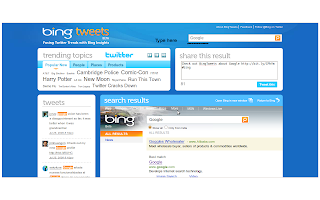
Moving further it join hand with the bing so that when ever you search on the bing you get all the tweets regarding that search. It allows to see the tweets on bing !!! Its in beta but still very cool.
Open bingtweets search the topic and see the tweets having the word. Once you do searching you can tweet or share too. It also displays current trends. Overall a good experience to use and again its simple.
Thursday, July 23, 2009
Google Chrome : Incognito mode (private browsing)
Today i think many people are using the Google Chrome as web browser. It not only gives a new interface but also fast browsing.
It have auto speed dial to remember the pages you visit, so that next time you simply click to move their. It have so many of features one is Incognito mode.
Incognito Mode also knows as private browsing. It allows you to browse without leaving the trace in history, cookies, on your computer after you close this.
To activate press Ctrl + Shift + . The new window will appear with the spy kind of icon on left corner. Rest everything remains same in interface.
Change locale in ubuntu
Sometimes we need to change the locale for some testing purpose or general shift to new. To change the locale in Windows is accomplished by Control Panel -> Regional Settings.
To change the same in the Ubuntu there are set of commands available.
To see current locale open terminal and run command 'locale'
If you know the locale you want to change to you should do following steps
1.add the locale in /var/lib/locales/supported.d/local
Eg : en_US.UTF-8
2. Regenerate the locale
dpkg-reconfigure locales
3. update locale using
update-locale LANG=en_US.UTF-8
Reboot the machine and again check the locale. It will be changed.
If you want to see the lost of supported locale
open /usr/share/i18n/SUPPORTED
We can make all the locales. Open terminal and run following commands
xyz@local: sudo su
root@local: cat /usr/share/i18n/SUPPORTED > /var/lib/locales/supported.d/local
root@local: dpkg-reconfigure locales
root@local: update-locale LANG=en_US.UTF-8
Reboot the machine and we are done.
Note : It will change the language of the PC so be careful Don't use this unless you are sure what you are about to do. In any case you can again set your locale to default and reboot.
Sunday, July 19, 2009
Web Application Development : Google Apps
What is Google App Engine ?
It lets you run your web application on Google Infrastructure. For more Detail move to google.
What make it out stand :
1. The best part is that it support Java and Python both.
2. You pay for for what you use.
3. No setup costs and no recurring fees.
Lets try our hand and built a very simple page.
Move to Google APP. You need to have a google (gmail) account.
Here come the first screen showing the button Create Application as shown.
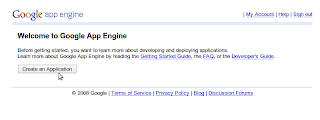
Click on Create Application. And the follwing screen will come which will ask for the mobile number for confirmation.
The next screen will be asking for the application details.

Fill the application identifier (must be unique).
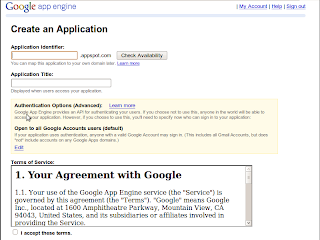
Give it a title. So that its easily understood. Press Save. A new screen saying application registration sucessfully will come.
So now all set. Download GoogleApp Engine toolkit. You have two option to go for java or python based on all type of machines.
I did with python as i have python installed :) . A zip file will be thr. Extract it.
If you are on linux make sure you have right permission for the folder.
Now create a directory with some suitable name.
Add three files
1. app.yaml
2. main.py
3. index.html
Add following lines to main.py
from google.appengine.ext import webapp
from google.appengine.ext.webapp.util import run_wsgi_app
from google.appengine.ext.webapp import template
from google.appengine.ext import db
import cgi
import os
class Table (db.Model):
element = db.StringProperty()
class Index(webapp.RequestHandler):
def get(self):
template_values = {}
path = os.path.join(os.path.dirname(__file__), 'index.html')
self.response.out.write(template.render(path, template_values))
application = webapp.WSGIApplication([('/', Index)],
debug=True)
def main():
run_wsgi_app(application)
if __name__ == "__main__":
main()
Add following code to app.yaml
application: [your folder]
version: 1
runtime: python
api_version: 1
handlers:
- url: /.*
script: main.py
Add some content in the index.html. Put text like
"My First Page using Google App Engine"
Now time to test the application on browser
Move to yourGoogle App Engine (SDK) folder that you extracted earlier (Using Terminal, cmd)
Run following command and replace [your app] by your folder name.
./dev_appserver.py [your app]
Open the browser type http://localhost:8080
BINGO !! You made the application using Google Apps :)
For more details visit :
Worth watching : Give it a look
The 40th anniversary of the first human landing on the moon : 20 July. There are many websites writing on this.
WeChooseTheMun.org the site worth watching. It will create the event minute by minute.
To viw the refurbished video by Nasa visit here.
Very Impressive one :)
Subscribe to:
Posts (Atom)

